
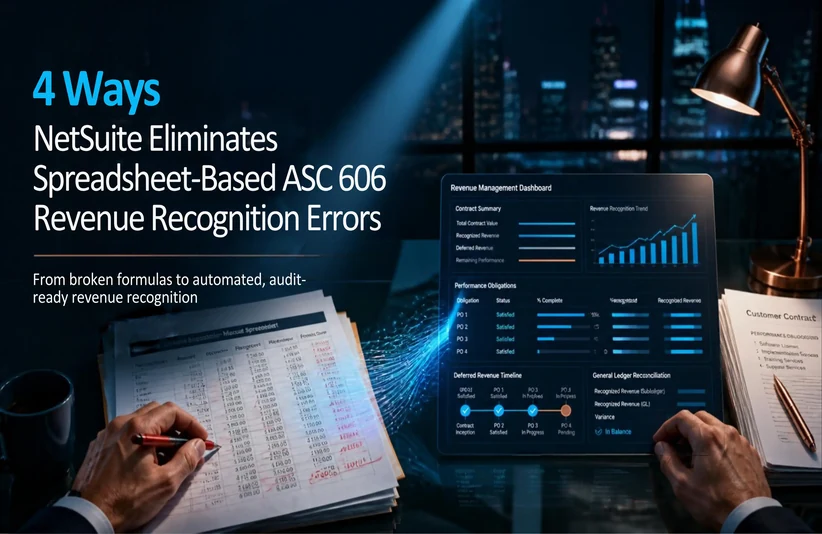
12 Oct 4 Ways NetSuite Eliminates Spreadsheet-Based ASC 606 Revenue Recognition Errors
4 Ways NetSuite Eliminates Spreadsheet-Based ASC 606 Revenue Recognition Errors
Many growing companies begin with Excel or Google Sheets to manage accounting tasks. Finance teams use these tools to handle multi-element contracts, track standalone selling prices (SSP), and build deferred revenue schedules. While spreadsheets seem simple and flexible at first, they quickly become difficult to manage as your customer base grows and contracts become more complex. What starts as a helpful tool soon turns into a tangled collection of disconnected files.
Accounting under ASC 606 Revenue Recognition (Revenue from Contracts with Customers) requires strict adherence to five core revenue recognition steps. Relying on manual data entry and complex spreadsheet formulas introduces major risks:
- Broken Formulas: A single deleted cell or broken lookup formula can distort financial outputs.
- Version Control Issues: Multiple team members editing separate files makes maintaining a single source of truth nearly impossible.
- Audit and Restatements: Manual data entry errors during month-end close can trigger costly audit adjustments, delayed financial reporting, and restatements.
To eliminate spreadsheet vulnerabilities, growing organizations need a systematic, automated revenue management system. Oracle NetSuite Advanced Revenue Management (ARM) provides built-in automation that removes manual work, ensures ASC 606 Revenue Recognition compliance, and streamlines month-end close.
Here are four key ways NetSuite ARM replaces risky spreadsheet processes with reliable, automated revenue recognition.
1. Automated Multi-Element Arrangement (MEA) and SSP Allocation
The Spreadsheet Pain Point: Under ASC 606 Revenue Recognition, when a customer contract includes a bundle of deliverables—such as software licenses, hardware, implementation services, and ongoing support—you must split the total transaction price across each element based on its Standalone Selling Price (SSP).
Calculating these allocations in a spreadsheet means building complex formulas and lookup tables. When pricing tiers, discounts, or fair value ranges change, formulas often break. Updating static models for each new contract tier is time-consuming and increases the risk of errors.
How NetSuite Solves It: NetSuite ARM makes this process easier by automatically grouping sales orders into comprehensive revenue arrangements.
- It uses predefined Fair Value libraries to assign and calculate SSP values for every performance obligation in a contract.
- When your pricing strategy or discount tiers change, NetSuite updates calculations dynamically without needing manual formula adjustments.
The Result: This approach delivers consistent, repeatable allocation calculations, removes formula errors, and gives you clear documentation for audits.
2. Dynamic Recognition Rules Replacing Static Formulas
The Spreadsheet Pain Point: Different deliverables require different accounting treatments. Some services are recognized point-in-time (upon delivery), while others are recognized ratably over time (subscription periods) or based on milestones (project completion).
Hardcoded spreadsheet formulas struggle to handle these varying triggers. A finance team member editing a cell to reflect a delayed project launch can easily overwrite formulas across an entire year’s worth of deferred revenue schedules.
How NetSuite Solves It: NetSuite replaces static spreadsheet formulas with event-driven recognition rules connected directly to actual operational activities:
- SaaS Subscriptions: Revenue recognition begins automatically based on subscription start and end dates.
- Professional Services: Schedules trigger upon approved milestone completions or logged project hours.
- Hardware & Goods: Recognition occurs automatically once the system confirms fulfillment or shipping.
The Result: Revenue recognition schedules run automatically in the background, triggered by real operational events. This ensures revenue is recognized exactly when it is earned.
3. Controlled Contract Modifications and Cumulative Catch-Ups
The Spreadsheet Pain Point: In fast-growing businesses, customer contracts rarely stay fixed. Mid-term contract amendments, upsells, downgrades, early renewals, and mid-period cancellations happen frequently.
Updating an existing spreadsheet schedule for mid-contract changes is complex. Finance teams often have to build extra tabs or overwrite historical numbers to reflect cumulative catch-up or prospective adjustments. This creates messy files, disconnected data, and limited audit visibility.
How NetSuite Solves It: NetSuite ARM follows strict ASC 606-10-25-12 standards for contract modifications. When a contract changes:
- You record the contract update directly within the existing revenue arrangement.
- NetSuite automatically determines whether the change requires a prospective adjustment or a cumulative catch-up adjustment.
- The system recalculates remaining revenue schedules instantly without altering or corrupting your historical accounting records.
The Result: You maintain a clear, continuous audit trail throughout the customer lifecycle, without the risk of orphaned spreadsheet entries or mismatched contract terms.
4. Real-Time General Ledger Sync and Deferred Revenue Tracking
The Spreadsheet Pain Point: When revenue tracking happens in offline spreadsheets disconnected from your primary accounting software, tracking deferred revenue (contract liabilities) and unbilled receivables requires continuous manual effort.
At month-end, finance teams manually prepare and post journal entries to match ledger balances with spreadsheet totals. This manual process often creates reconciliation gaps between billing logs and balance sheet accounts, which extends the close cycle.
How NetSuite Solves It: NetSuite ARM integrates revenue management directly with your core General Ledger (GL):
- Revenue recognition schedules post journal entries directly to the GL as operational events occur.
- Deferred revenue and unbilled receivable balances update continuously in real time.
- Billing records and revenue schedules remain connected within a single system.
The Result: Your finance team gets immediate visibility into deferred revenue balances, simplifies account reconciliations, and reduces month-end close timelines from weeks to just a few days.
Summary Comparison: Spreadsheets vs. NetSuite ARM
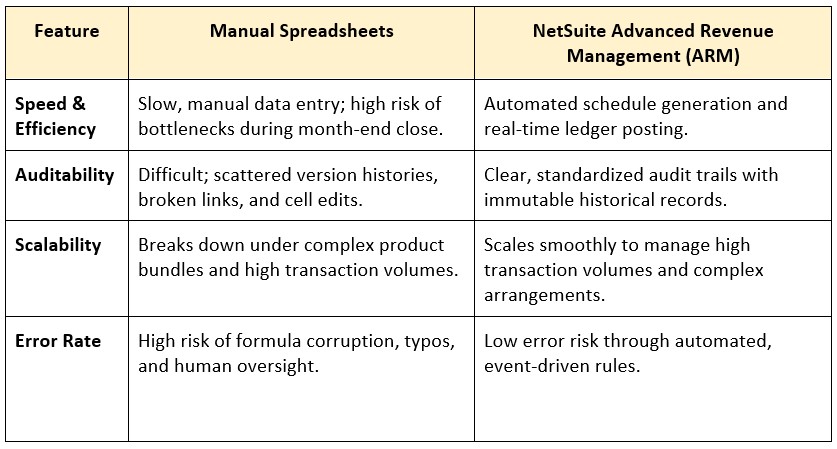
Manual spreadsheets may work for small businesses at first, but they quickly become operational liabilities as transaction volumes and revenue recognition requirements grow under ASC 606 revenue recognition Compliance.
Moving from manual, error-prone spreadsheets to automated revenue management software protects your financial data, reduces audit preparation time, and lets your finance team focus on strategic growth.
If you are ready to stop spending the last week of every month fixing spreadsheet formulas and worrying about audits, contact our Revenue Automation Experts to see how NetSuite Advanced Revenue Management can simplify your ASC 606 revenue recognition compliance.